
Launchzy systems E-commerce analytics
MORDAX
See how customers shop. Check what actually sells.
About this system
From a storefront visit to a confirmed order.
MORDAX brings together storefront activity collected with consent and verified order records. See where shoppers hesitate without mistaking a checkout event for a completed sale.
System map
One workspace. Different kinds of evidence.
System map
- Shop activity
- Verified orders
- Analysis
A conceptual view of MORDAX: browsing activity and verified orders remain distinct so you can compare them.
How it works
Follow the journey. Verify the outcome.
Storefront activity
See the available steps from browsing to cart and checkout. Only activity collected with consent is included.
Verified orders
Check completed orders separately from browser events. Review revenue after refunds where records are available.
A question worth checking
Use the evidence to decide which page, traffic source or checkout step to investigate next.
Two sources. One place to investigate.
- Shop activity
- Order records
- MORDAX workspace
- Next question
Browsing data collected with consent shows the journey. Verified order records show sales. Compare the two to decide what to investigate next.
In practice
A closer look at the workspace.
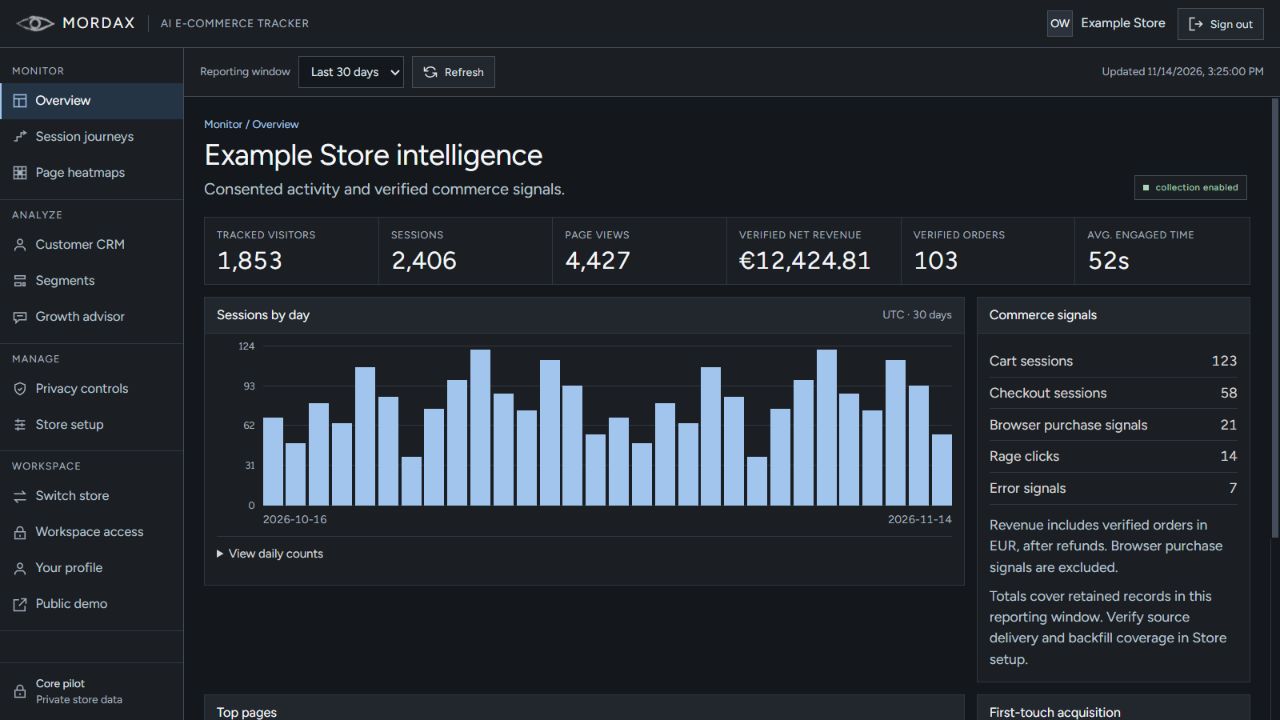
The session chart describes how visitors moved through the shop. The order and revenue figures come from a separate set of records. Read them side by side, not as the same metric.
Discuss MORDAX
MORDAX is in an invite-only pilot. Tell us about your store and what you want to understand. We’ll reply by email if there’s a fit.